A Collection Plan enables you to send automated email reminders to your customers about their outstanding invoices. You can configure the timing, frequency, and content of each reminder to streamline your receivables workflow.
Use the steps below to create a new plan in the Paystand Dashboard.
Creating a Collection Plan
1. Click Receivables

2. Click Collection Plans

3. Click Create a plan

4. Enter Plan Name

5. Select the number of Days
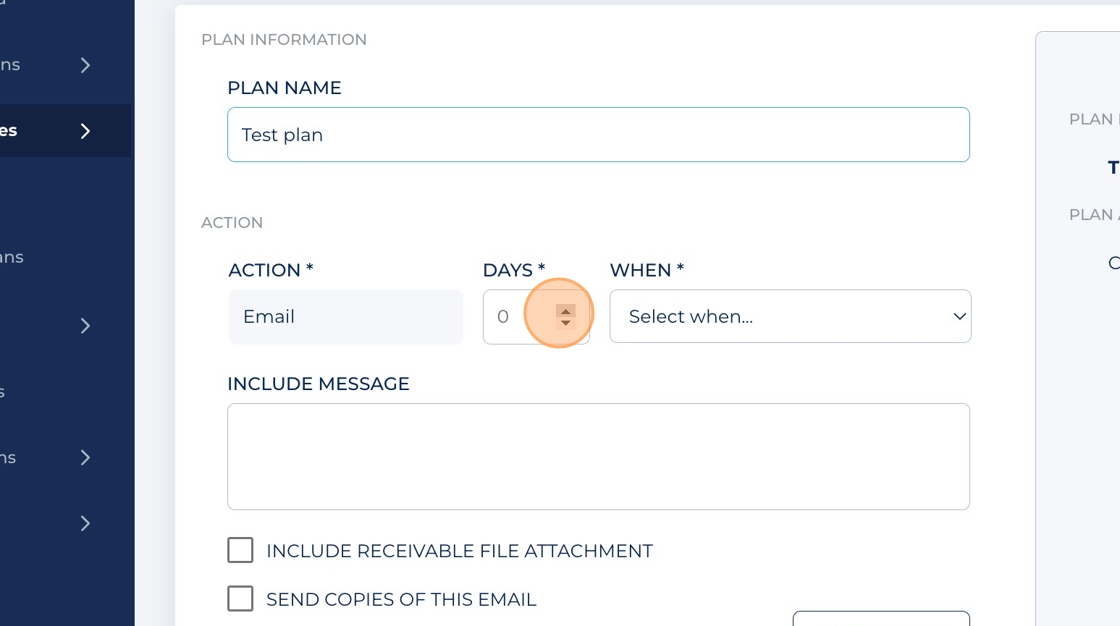
6. Select When from the drop-down

7. Include a custom message if desired

8. To include the Sage Invoice, check the Include receivable file attachment field if desired

9. Click Send copies of this email if desired

10. Click Add action. Repeat these steps if you want to include additional actions

Customize plan reminders
Each plan can include one or multiple reminder steps. You can customize each step by setting:
When the reminder should send based on the invoice’s due date
Add a custom message
Include the invoice as an attachment
You can edit or delete steps at any time.
Assign a Collection Plan
After creating a plan, you can assign it at either level:
Invoice level
Customer level
Assignments can be made from the customer record or from the Receivables tab.
Things to know
Things to know
- Reminders only send when an invoice meets all plan criteria
- You can pause or deactivate a plan at any time
- Customers can only have one active plan assigned at once
- If a Collection Plan is active and you enable Autopay, the Collection Plan is disabled automatically